
Routing urgent emails to Slack using basic AI sentiment filters
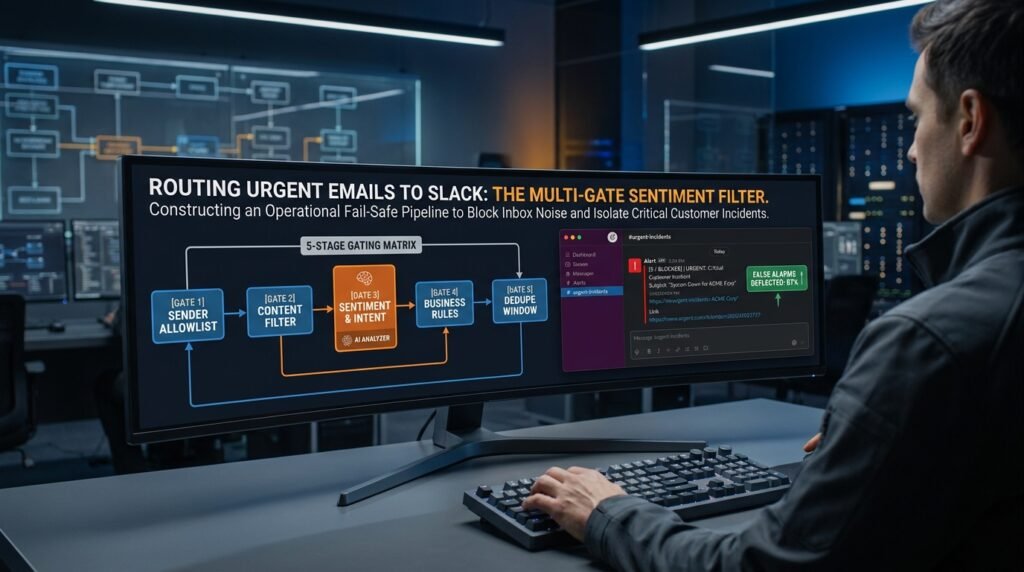
A sentiment filter alone will spam your Slack channel inside a day, because AI reads frustration in plenty of emails that nobody actually wants a ping for. A smarter model won’t fix that. Gating the sentiment score behind hard, explicit conditions before any message ever reaches a channel will. Get the gates right and you’ll see only the emails that earn a notification.
Why pure sentiment routing spams you
AI tone reading is a useful signal and a terrible decider.
A model reads emotion from words, not from context. The morning automated alert that says ‘CRITICAL: backup failed’ scores as urgent every single day, even though it’s routine. A customer who writes ‘I’m so frustrated, I can’t find the login button’ reads as panicked, and they just need a link. Marketing emails that shout in capitals score high too. If you wire ‘sentiment is negative’ straight to a Slack message, you’ve built a notification firehose that everyone mutes within a week, which defeats the whole point.
The trigger-action schematic that keeps it quiet
Here’s the full filtering logic, top to bottom. Each gate sheds a category of false alarm.
Figure 1. Five gates between an inbox and a Slack ping INCOMING EMAIL │ ▼ [GATE 1] SENDER ALLOWLIST is it from a real human / known domain? drop: newsletters, no-reply, marketing lists │ pass ▼ [GATE 2] CONTENT TYPE FILTER drop: automated system alerts, calendar invites, receipts, bounce notices, out-of-office │ pass ▼ [GATE 3] SENTIMENT + INTENT (the AI step) classify: urgency 1-5 + intent (complaint / blocker / question / praise / FYI) │ urgency >= 4 AND intent in │ (complaint, blocker) ▼ [GATE 4] BUSINESS-RULE GATE is this customer/account on the priority list? during business hours? not already pinged today? │ pass ▼ [GATE 5] DEDUPE WINDOW same sender + same thread within 4h? -> drop │ pass ▼ POST TO SLACK (with subject, sender, 1-line summary, and a link back to the email) |
The order matters. The cheapest filters run first, so the AI call only ever sees emails that already passed the basic checks. That keeps the cost down and stops the model from being the bouncer for traffic it has no business judging in the first place.
What each gate actually does
A short word on every layer, in the order they fire.
- Gate 1 cuts the obvious noise: newsletters, no-reply senders, anything from a marketing domain. A simple allowlist of human-sender domains and a blocklist of common no-reply patterns kills most of the bulk noise for free.
- Gate 2 cuts the automated traffic: ‘CRITICAL’ alerts that arrive every morning, calendar replies, delivery receipts. Use header and subject patterns, since these messages have stable formats.
- Gate 3 is the only place AI gets to speak. Ask for two outputs: an urgency score and a short intent label. Treat them as a pair, since a complaint with a low score is rarely an urgent matter, and a frustrated question is usually a support ticket, not a fire.
- Gate 4 adds your real-world context: which accounts you care about most, when you’re on call, and whether you’ve already been pinged for this thread today.
- Gate 5 deduplicates. One thread shouldn’t ping you five times because the customer kept replying.
The classifier prompt
This is the only AI call in the whole flow, and it does two jobs at once.
The two-field classifier prompt Classify the email below. Return JSON only.
Fields: urgency: 1-5 (1 = FYI, 5 = service down or person cannot complete a key task right now) intent: one of “complaint”, “blocker”, “question”, “praise”, “fyi” one_line: a 12-word summary, no greeting
Rules: – Score on the actual situation, not on caps or exclamation marks. – A frustrated tone alone is not urgency 5. – If the email looks automated (no-reply, system alert, receipt), set intent = “fyi”.
Email: “”” [subject + body here] “”” |
Two outputs beat one. A single ‘urgency’ number conflates a furious praise email and a quiet ‘our payment failed,’ which need very different routes. Pairing the score with an intent label lets Gate 3 fire only on the combinations you care about, which is what keeps the channel useful.
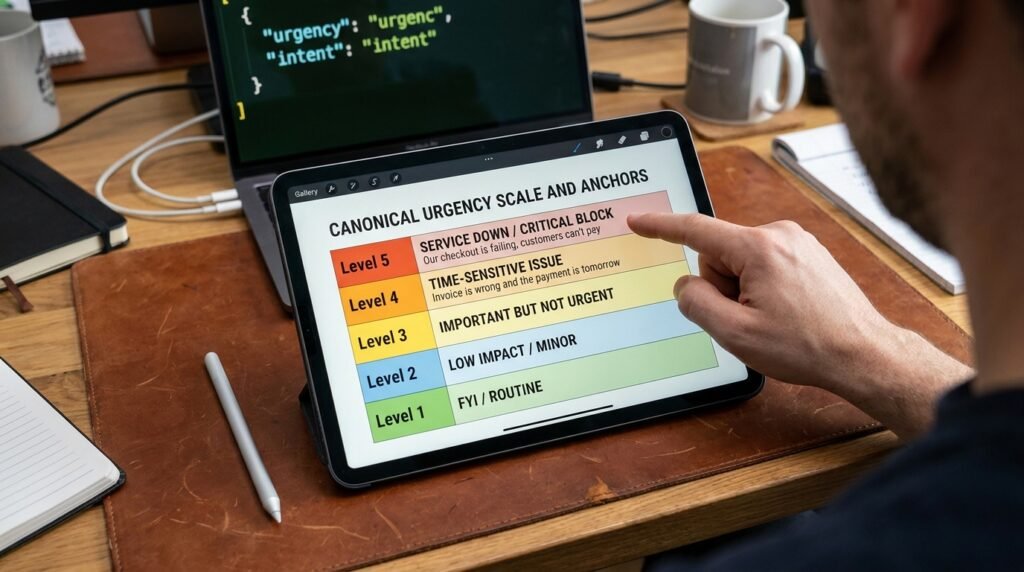
The 1 to 5 scale, defined so a model can actually use it

Vague scales make the model invent its own.
‘Urgent’ means nothing to a classifier unless you anchor what each level is. Spell out the rungs in plain words, and you’ll stop seeing every angry email scored a 5.
Score | What it means | Example |
5 | Service down or person blocked right now | ‘Our checkout is failing, customers can’t pay’ |
4 | Real problem, time-sensitive, not a full outage | ‘Invoice is wrong and the payment is tomorrow’ |
3 | Real ask, no fire | ‘Can you confirm the meeting time for Thursday’ |
2 | Mild frustration, no urgent action needed | ‘Took a while to find this in your docs’ |
1 | FYI or routine | Newsletters, receipts, calendar updates |
The wiring, in plain steps
This is what the pipeline looks like in any of the major automation tools.
The trigger is a new email in your inbox. A first filter step drops senders on the blocklist. A second filter drops automated content by header or subject pattern. An AI step runs the classifier prompt and returns the JSON, which the next step parses into fields. A third filter checks urgency and intent. A short data-lookup step checks your priority-account list, business hours, and a recent-pings table. A dedupe step compares against the same sender and thread in the last few hours. Only then does a Slack action post the formatted message. Eight short steps, with the AI doing one job, and each filter doing one. The shape is what makes it debuggable when a wrong ping gets through, because you can step backwards and see exactly which gate let it past.
Tuning to keep the channel useful
Your first week will be too loud or too quiet. Plan for that.
- Start with the strictest gates: urgency 5 only, plus intent in (complaint, blocker), business hours only. You’ll get fewer pings than feels right, on purpose.
- Log every email that the gates dropped, with the AI scores. Review the log daily for a week.
- Move the threshold only when the log shows real misses, not when the channel feels empty. An empty channel for a day is not a problem.
- When something slips through that shouldn’t have, add a rule, not a model tweak. A new pattern in Gate 2 beats prompt fiddling.
- Add an ‘always escalate’ allowlist for a handful of named senders. VIP customers bypass the score entirely.
Format the Slack message so a glance is enough
A ping is only as useful as the first line.
The Slack post should answer the same questions a triager would ask: who, what, how bad. Lead with the urgency score and intent, follow with sender and subject, then the one-line summary, and end with a clickable link back to the email. Skip the full body; the link is faster than scrolling. And use a single channel, not a hierarchy of them. Splitting into ‘#urgent’ and ‘#more-urgent’ is the move that quietly trains people to ignore the first one.
One Slack post, four lines [5 / blocker] sarah@acmecorp.com Subject: Checkout failing for all our customers Summary: payments page returning errors since 9:42 Open: <link to the email> |
Why I dropped the snooze and digest features
Most people add ‘send a digest in the morning’ and ‘snooze until 9am’ to this kind of pipeline. I stopped doing both.
A digest defeats the point: if the channel matters, you don’t want news of a 9am outage delivered at noon. And snooze logic adds branches without removing any false positives, since the things that wrongly trigger at 11pm also wrongly trigger at 11am. What actually helps is the business-hours gate already in the schematic, which silences pings outside your shift entirely, and a single named on-call user mentioned in the post, so the right person sees it whether they’re in the channel or not. Fewer features in this pipeline have produced more useful pings, in my experience.
What this does well, and what it doesn't
Sentiment routing is a triage tool, not a service desk.
It earns its keep by pulling a few genuinely time-sensitive emails out of a noisy inbox faster than a human eye would, so someone can act inside minutes instead of hours. It’s not a replacement for a ticket system, a response policy, or a clear on-call rotation. The classifier will miss things, and the gates will occasionally drop something that mattered. Knowing both lets you set realistic expectations with whoever’s watching the channel.
Questions people actually ask
Won’t real emergencies arrive politely worded and get filtered out?
Sometimes, yes. A calm customer who writes ‘just letting you know our site is down’ has urgency 5 and a quiet tone, which is why the intent label matters. Pair urgency with a ‘blocker’ or ‘service-down’ intent and the polite emergency still passes. If you scored on tone alone, you’d miss it.
How much will this cost to run on a busy inbox?
The AI cost depends on volume, but the early gates cut most of the traffic before it ever reaches the model. On a typical inbox, 70 to 90 percent of messages are filtered by sender and content type alone, so you’re only paying to classify the remainder. Verify the per-call price for your model, and watch the monthly count.
Should I use my email provider’s built-in priority feature instead?
They handle the easy cases, like obvious newsletters, and they’re worth turning on. They don’t replace this pipeline, because they aren’t reading intent against your business rules. Use the provider’s filters as a free first pass, then layer the sentiment-and-intent gate on what remains.
My team uses Teams, not Slack. Does any of this change?
Only the last step. The gating logic is the same; the post target swaps. Most automation tools have an action for each major chat app, so you can keep the entire pipeline and change only the final action.
Can I make it learn from the times I ignore the ping?
Sort of, and carefully. The honest version is to add a thumbs-down reaction in Slack and review those weekly, then update the gates and the prompt examples. Asking the AI to ‘learn’ on its own without a human in the loop is how rules drift over a month into something nobody can explain.
Should one Slack post per email, or batch them?
One post per email, for anything that passes all five gates. Batching defeats the purpose of this pipeline, since the value of the channel is fast triage on a small number of high-stakes messages, not a tidy hourly summary. If batching ever feels necessary, the gates are too loose, and the right move is to tighten Gate 3 rather than buffer the output.
Is it safe to send my email content to an AI provider?
That’s a policy question, not a technical one. Many enterprise plans treat the data you send as yours and not as training material, while consumer plans vary. Before pointing this at a work inbox, check your organization’s policy and the provider’s terms. If the content is sensitive, run the classifier inside an approved tenant rather than a personal AI account, and avoid including personal data in the one-line summary that posts to Slack.
Start strict, then loosen slowly
Wire the five gates in the order shown, set Gate 3 to fire only on urgency 5 plus a ‘blocker’ or ‘complaint’ intent, and log everything that gets dropped. Review the log every day for a week and only relax a threshold when the log shows a real miss. The goal isn’t a busy channel; it’s a channel you trust enough to act on when it does light up.