
Mapping the difference between polling triggers and instant webhooks in AI automations
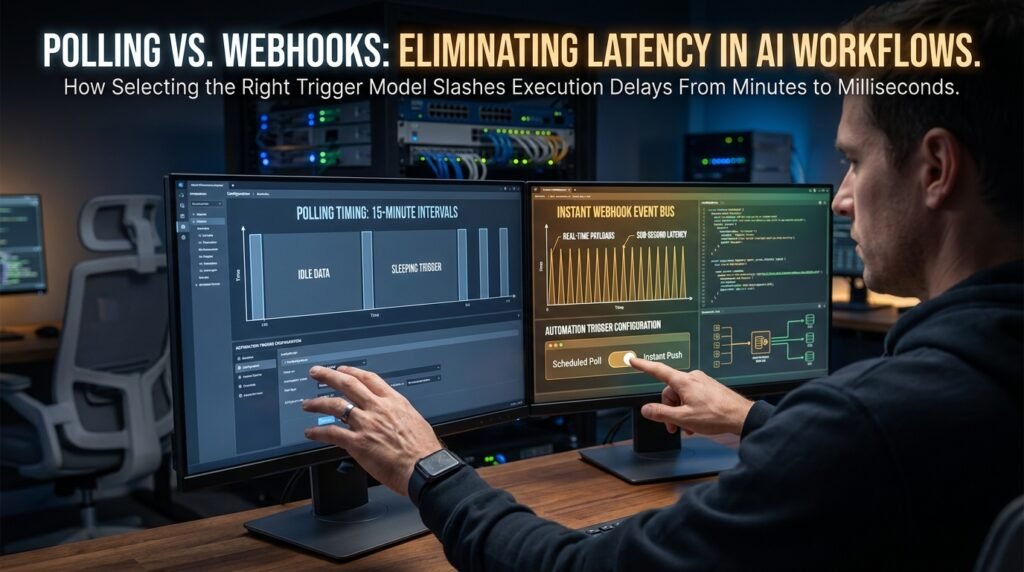
If your automation sometimes runs in two seconds and sometimes takes fifteen minutes, you’re almost certainly using a polling trigger instead of a webhook. Polling is your automation tool checking the source app on a schedule, every 5 or 15 minutes, and only acting on what it finds at that moment. Webhooks fire the second the source app has news. The behavior difference is not in the AI or the action; it’s in the trigger you picked.
What the two triggers actually do
Polling is pull. Webhooks are push.
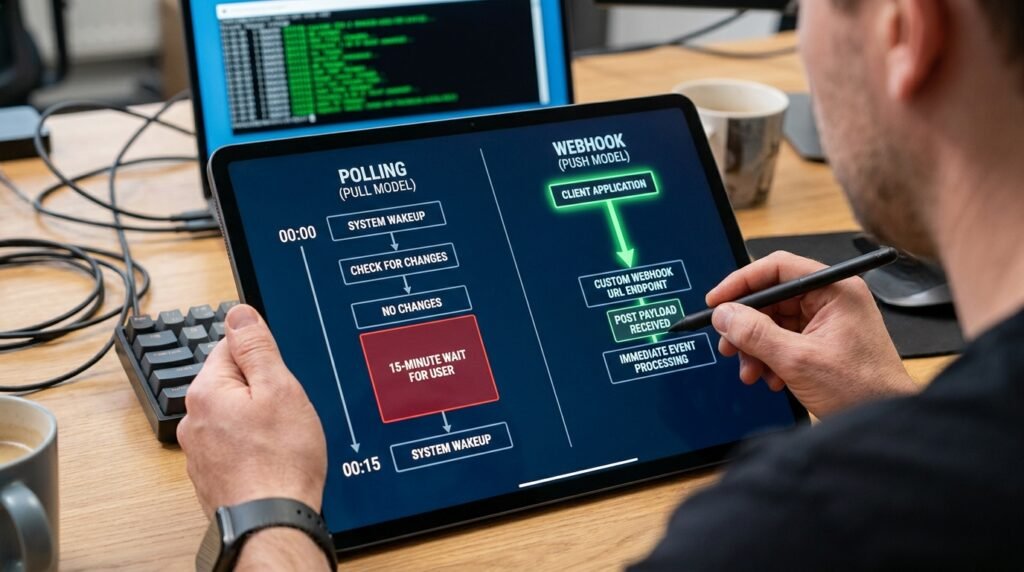
A polling trigger is a small program that wakes up on a fixed schedule, asks the source app ‘anything new since last time?’ and pulls whatever it gets back. Between checks, nothing is happening; the trigger is sleeping. A webhook trigger is the opposite: the source app holds the trigger’s URL and calls it the instant something happens. There’s no schedule, no waiting, no ‘I’ll get to it in fifteen minutes.’ One pattern is patient; the other is reactive. The choice between them sets the timing of everything downstream.
Most automation platforms expose both, and which one you’ve picked is usually buried in the trigger’s settings. The label often says it: ‘New email (polling)’ versus ‘New email (instant).’ Knowing which you’ve chosen explains every timing surprise the automation will ever produce.
The timing diagram
Here’s why one runs in seconds and the other in minutes.
Figure 1. Same event, two trigger types, two latencies EVENT HAPPENS AT t=0 │ │ POLLING TRIGGER (5-minute interval): t = 0 event happens, nobody noticing yet t = 1 … sleeping … t = 2 … sleeping … t = 3 … sleeping … t = 4 … sleeping … t = 5 wakes up, asks source: ‘anything new?’ source: ‘yes, this event from t=0’ automation starts t = 5.1 AI step runs, action fires TOTAL LATENCY: 5 minutes + processing
WEBHOOK TRIGGER (instant): t = 0 event happens source app POSTs to webhook URL t = 0.1 automation tool receives the POST t = 0.2 AI step runs, action fires TOTAL LATENCY: under a second + processing |
That’s the whole answer to ‘why is my automation sometimes slow.’ If the event happens just after a poll, you wait nearly the full interval before anything happens. If it happens just before, you barely notice the delay. The variance is built into the trigger model, not into the AI or the action.
A worked example you can picture
Imagine a sales team that auto-replies to inbound contact-form submissions.
On a polling trigger checking the form provider every 15 minutes, a prospect who fills the form at 9:01am gets their AI-drafted reply between 9:15 and 9:16. Acceptable for some businesses, infuriating for one selling a fast response as part of the pitch. On the same form provider’s webhook trigger, the same submission produces a reply at 9:01:08, eight seconds after they hit submit, of which most is the AI generation itself. Same model, same prompt, same Slack notification underneath, vastly different felt experience. The technology that changed wasn’t the AI; it was the trigger.
Now run the same comparison from the cost angle. The polling trigger fires 96 times a day whether forms came in or not, eating roughly 96 task credits and 96 API calls into the form provider just to confirm ‘nothing new yet.’ The webhook fires only when a real form arrives, maybe 20 times a day. Over a month, the polling version cost roughly 2,880 background checks; the webhook cost 600 real-event firings. On a per-task plan, the difference shows up on the bill.
Why polling exists at all
If webhooks are faster, why isn’t every trigger a webhook?
Webhooks require the source app to support them. Many systems do, but plenty don’t, especially older databases, internal tools, and apps where ‘something changed’ isn’t a meaningful event. Polling works against anything you can query, so it’s the universal fallback. Polling is also the right choice when the event you care about is actually a state (‘this record has been in pending for 24 hours’), since states don’t fire events; you have to look for them. Webhooks are about events; polling is about states. Pick by the shape of what you’re watching for.
The trade-offs, side by side
Polling and webhooks differ on more than speed.
Dimension | Polling | Webhook |
Latency | Up to one full interval | Sub-second |
Source support needed | Any queryable source | Source must offer webhooks |
Reliability when source is down | Catches up on next poll | Events fired during outage can be lost |
Catches state, not just events | Yes | No, only fires on events |
Cost per check | One API call per poll, even when nothing changed | One call per real event |
Trigger limits on free plans | Often capped at 15-minute intervals | Usually unlimited count |
Set-up complexity | Pick the source, pick the interval | Source must be configured with your URL |
Best for | States, slow processes, sources without webhooks | User-facing events, real-time work |
The reliability row is the one people overlook. When your automation platform is briefly down, polling will pick up everything it missed on the next cycle, since the source’s state still reflects the events. A webhook fired during the outage might be retried by the source, but might also be lost entirely. For events you cannot afford to miss, polling has a quiet advantage.
How to tell which trigger you're using
Three checks reveal it quickly.
- Read the trigger’s name. Most platforms label polling triggers with the interval (‘every 15 minutes’) and webhook triggers with ‘instant’ or ‘real-time.’
- Look at the trigger’s configuration. A polling trigger asks for an interval. A webhook trigger gives you a URL to paste into the source app.
- Watch the task history. Polling runs at regular times even when nothing’s happening (most tools optimize this out, but the schedule is the giveaway). Webhook runs cluster around real events.
If you can’t find the interval and there’s no URL to paste into the source, the trigger is probably a managed integration that hides the choice from you. Read its docs to find out whether it’s poll-based or push-based; both exist behind the same friendly UI.
What changes when the source is your own database
If you control the source, the choice becomes a design decision rather than a what’s-available decision.
For an internal database or an in-house tool, you can usually add webhook emission to the place where the event actually happens, the moment the record is inserted or updated, the application can POST to your automation tool’s URL. That gives you the lowest possible latency and the cleanest semantics, because the event fires exactly when it should. Polling against your own database, by contrast, has all the same trade-offs as polling anyone else’s: latency depends on the interval, and you’re paying for queries that often return nothing. The reason to prefer polling on your own data is usually historical, an automation that started small and never got rebuilt, rather than technical. If you’re starting fresh, emit events.
Polling intervals: shorter isn't always better
A 1-minute poll sounds good and isn’t always the right choice.
Three constraints push back. The source app’s rate limit may not tolerate 1,440 daily queries from your account, especially on a free or low-tier plan. Your automation platform may charge per task, so a tighter interval directly multiplies the bill. And the operation downstream may not benefit from sub-minute responsiveness anyway; if a human is reading the output once an hour, a 30-second poll buys nothing over a 5-minute one. Pick the longest interval the user-facing experience tolerates, not the shortest your plan allows. The honest test: would a real user notice the difference between this interval and one twice as long? If not, use the longer one.
Picking the right one for an AI workflow
AI doesn’t care which trigger fired it, but the user-facing experience does.
Anything a person is waiting on, an auto-reply to a customer email, a triage post into a channel, a confirmation back to a form submission, deserves a webhook. The 15-minute latency of a poll is a noticeable delay that erodes the ‘instant assistant’ feeling. Anything purely internal, batch-style or background, is fine on a poll: end-of-day summaries, scheduled enrichments, hourly cleanups. The cost difference also matters at scale: a 1-minute poll that finds nothing 95% of the time is paying for 1,440 daily API calls just to confirm ‘still nothing,’ where a webhook would have made zero calls.
What 'instant' really means with AI in the loop
Webhook doesn’t mean instant end to end.
Even on a webhook trigger, the AI step itself takes time. A short classification might be a fraction of a second. A long generation can be 10 to 20 seconds. The trigger latency is sub-second; the total automation latency is trigger plus AI plus action. So an ‘instant’ webhook-driven workflow with a long AI step is still going to take 5 to 20 seconds end to end. That’s worlds better than a 5-minute poll, and it’s not zero. Be clear about which part of the timeline you’re describing when you set expectations with users.
Debugging when nothing's happening
A silent automation is the hardest one to fix, and the trigger is where to look first.
On a polling trigger that seems to have stopped, check the polling history in the platform’s logs. If the polls are running and returning nothing, the source query is wrong or the source’s state isn’t changing the way you assumed. If the polls aren’t running at all, the trigger is disabled or the source’s authentication has expired. On a webhook trigger that’s silent, log into the source app and look at its outbound delivery history; many apps keep a record of every webhook they tried to send, with success or failure for each attempt. A clean source-side history with no successes tells you your URL is wrong or your platform isn’t accepting the payload. A history of failures with retry timestamps tells you your platform was unreachable when the events fired, and those events may be lost depending on the source’s retry policy.
Handling the failure modes of each
Different trigger, different failure mode.
Polling fails by missing nothing and being late. The reliability concern is the time gap: the longer your interval, the more events pile up between checks, and the bigger the batch each run has to handle. Webhooks fail by missing things: a network blip, an app outage, a misrouted POST, and the event is gone unless the source retries. The defensive moves are different. For polling, watch the per-run record count; if it spikes, your interval is too long. For webhooks, configure idempotency, log every event id you receive, and reconcile against the source app periodically to catch the events that quietly went missing.
Hybrid: webhook for speed, poll for safety
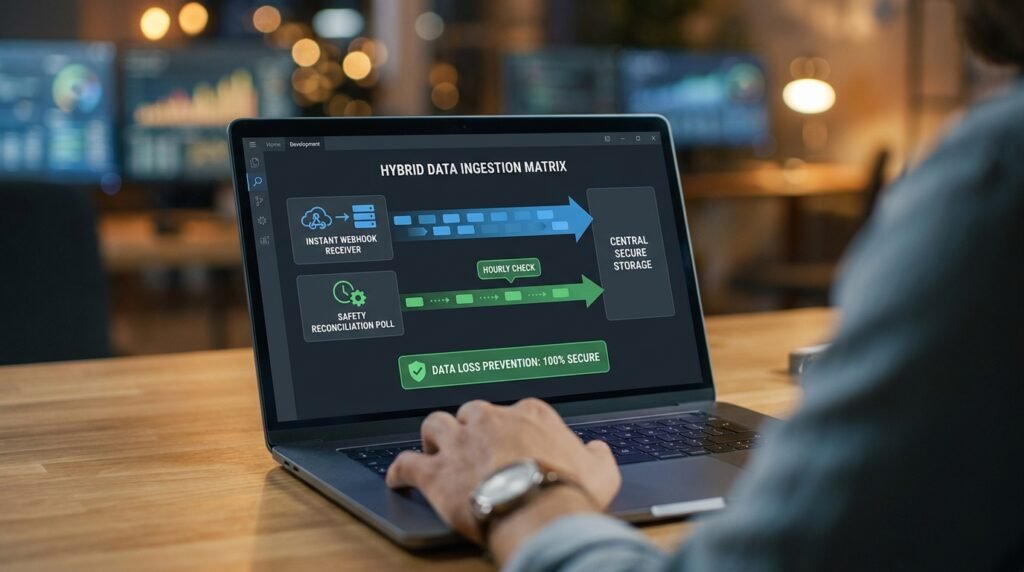
On a workflow where missing events would be expensive, run both.
The pattern is straightforward: a webhook fires for low-latency processing of normal events, and a slow poll, maybe once an hour, catches anything the webhook missed. Each event has a unique id, so the poll skips events the webhook already handled. You get sub-second latency on the happy path and a safety net on the unhappy one. The overhead is modest because the poll usually finds nothing new, but you’ve covered the rare case where a webhook delivery failed. This is the architecture I default to whenever the consequences of a missed event would be noticed.
Questions people actually ask
Why does my AI step take 15 minutes sometimes and 30 seconds other times?
The AI step itself isn’t doing anything different. The variance is almost always the polling trigger’s wait time before the event was even noticed. Switch to a webhook trigger if the source supports one, and the variance collapses into the AI step’s own runtime.
My platform charges per task. Which trigger uses more credits?
It depends on volume. A 1-minute polling trigger that runs 1,440 times a day uses credits whether or not anything’s happening, on most platforms. A webhook only uses credits when a real event fires. If your event rate is much lower than your poll rate, webhooks are dramatically cheaper. If events are constant, the difference is small.
Can I make polling faster by checking every minute?
Sometimes, and there are limits. Many platforms cap polling intervals on lower tiers at 5 or 15 minutes. Even on plans that allow 1-minute polls, the source app’s own rate limits may push back if you query it too aggressively. Use the shortest interval your plan and the source both tolerate, and accept that even 1-minute polling is far slower than a webhook.
What about long-running AI tasks, like analyzing a long document?
Trigger speed matters less here, because the AI step dominates. Use whatever trigger fits the source, and shift your attention to handling the long generation properly: increase the step’s timeout, switch to an asynchronous API pattern if the wait pushes past your platform’s per-step limit, and consider splitting the document so each piece processes faster.
Can I switch from polling to webhook without rewriting the rest?
Usually yes. The trigger step is at the top of the automation; everything below it reads from a payload the trigger produces. Webhooks and polls often expose nearly the same payload shape for the same event, so the downstream steps don’t need to change. Test on a sample, since field names can differ slightly between the two trigger types.
Webhook security, briefly
A webhook URL is a back door if anyone can find it.
Don’t paste the URL into shared documents, screenshots, or anywhere it can be scraped. Use the signing secret most senders offer, so your automation can verify each incoming POST really came from the source. Validate the event type at the top of the automation, so a stray payload doesn’t trigger anything important. And rotate the URL if it’s ever been exposed, even briefly, because it can’t be unguessed. These steps are quick to apply and they’re what separates a webhook setup that holds up to scrutiny from one that’s a future incident.
Audit your slowest automation
Open the automation that frustrates users with its timing. Find the trigger step. If it’s polling, check whether the source app offers a webhook trigger and switch to it. If it doesn’t, shorten the interval to the minimum your plan allows. Either way, you’ll see the variance shrink and the average latency drop, without touching a single line of the AI step or the action below it. The trigger was always the bottleneck; you just couldn’t see it from below.

Hi I’m Muzammil Haqani. I’m a content creator and AI expert with 3+ years of experience exploring and writing about artificial intelligence and technology. Through this blog, I share tutorials, insights, and practical guides to help readers understand and use AI tools effectively in their everyday lives.
Thank you for sharing your info. I truly appreciate your efforts and I will be waiting for your next post thanks once again.