
Understanding system instructions versus user messages in AI interfaces

System instructions are standing orders that apply to every message in a conversation. User messages are the one-off requests you type each time. Mixing the two up is why your ‘always do this’ rule keeps getting ignored, and why a chat sometimes behaves in ways you set weeks ago and forgot. Knowing which layer does what is the gap between a tool that behaves and one that keeps surprising you.
The two layers, in plain terms
Think of it as a job description versus a daily to-do.
A system instruction is like the brief you give a new assistant on day one: always reply in British English, never share internal figures. You set it once and it colors everything they do afterward. A user message is today’s actual task, ‘draft a reply to this client,’ which the assistant carries out through the lens of those standing rules. The model treats these two inputs differently, even though in many consumer apps they arrive in what looks like the same chat box.
That shared box is the source of most confusion. The rules you set in settings and the request you type in chat feel like the same thing to you. They aren’t handled the same way underneath.
System instruction versus user message, side by side
This is what each layer controls, and who wins when they disagree.
Dimension | System instruction | User message |
What it’s for | Standing rules for the whole session | The specific task right now |
How long it lasts | Persists across every turn | Applies to that turn and recent context |
Where you set it | Settings, a profile, or the API system role | The chat box, each time you type |
Priority | Frames and constrains everything below | Adjusts details, not the hard rules |
Good use | Tone, format, role: things that never change | The content and one-off tweaks |
Bad use | Stuffing today’s task in here | Re-typing permanent rules every message |
The priority row is the one worth sitting with. A system instruction sets the boundaries of the room. A user message moves around inside it. You can ask in chat for a longer answer than usual and get it, but if the system layer says ‘never reveal pricing,’ a chat request for the price list should still be refused. The standing rule outranks the one-off ask on anything it explicitly governs.
Seeing both layers in one exchange

An example makes the split obvious.
Say you set a standing instruction once, then type a normal request the next day. Here’s what each layer is doing.
The two layers, working together SYSTEM (set once, in settings): You are my writing assistant. Always use UK spelling. Never use exclamation marks. Default to plain language.
USER (typed today, in the chat): Draft a 2-line thank-you note to a client for their patience during the delay. |
The reply comes back in UK spelling with no exclamation marks, because the system layer governs those, and as a short, plain note, because that’s today’s task. You didn’t restate the spelling rule. You set it once, and it rode along under the request. Change the task tomorrow and the standing rules still apply.
What actually belongs in your system layer
Good standing rules share one trait: they hold true regardless of today’s task.
After setting these up across a few tools, a short list of what earns a place in the system layer became clear.
- Your default tone and reading level. ‘Plain language, no jargon, around grade 9’ applies to almost everything you ask.
- Hard lines you never want crossed. ‘Never invent statistics’ or ‘never share client names’ belong here, not in a chat you might forget to set up.
- Output defaults. If you almost always want short answers, say so once instead of every time.
- Who the model is for you. ‘You assist a solo bookkeeper’ gives every answer the right frame.
Notice what’s missing: anything tied to a single task. The moment a rule starts with ‘for this email’ or ‘in this report,’ it belongs in the message, not the standing layer.
Who wins in a conflict
Higher layers set the limits; lower layers fill in the details.
The rough order of authority, from strongest to weakest, runs: the provider’s built-in safety and policy rules, then your system instructions, then your user messages, then any examples or files inside a message. A user message can override a soft default from the system layer, say, asking for a one-time exception to your usual format. It can’t override a hard constraint the system layer states plainly, and none of your layers can override the provider’s safety rules. That last point catches people who think a clever chat prompt can talk the model into forbidden behavior. The top layer was never yours to move.
Here’s a conflict resolved in practice. My system layer says ‘keep answers under 150 words.’ I then ask, in chat, for ‘a detailed full-page explanation,’ and I get the long version, because length is a soft default the task can override. But when my system layer says ‘never include real client names’ and a chat message asks it to ‘use the actual names from the file,’ a well-configured tool holds the line, because that rule was set as a hard limit, not a preference. The wording you choose when you set a rule signals which kind it is.
There’s a catch worth knowing. The longer a conversation runs, the more a system instruction can fade in practice. Not because its priority changed, but because, on some tools, a very long chat pushes early context toward the edge of the window. If a standing rule seems to slip after a long session, restating it is fair game.
Where to set each, in the tools you use
The names differ by product, but the layer is the same.
Tool | Where the ‘system’ layer lives | Worth knowing |
ChatGPT | Custom instructions, plus per-project instructions | Applies to new chats, not retroactively |
Claude | Project instructions, or the system prompt via API | Project rules persist across that project’s chats |
Gemini | Saved info and personalization settings | Account-level; check what’s in scope |
Any API | The dedicated system role in the request | Most explicit; you set it on every call |
If your tool has no obvious settings layer, the workaround is to open each session by pasting your standing rules as the first message, then doing your tasks below it. It’s rougher than a real system layer, but it puts the rules first, which is most of the benefit.
If you use the API, the split is explicit
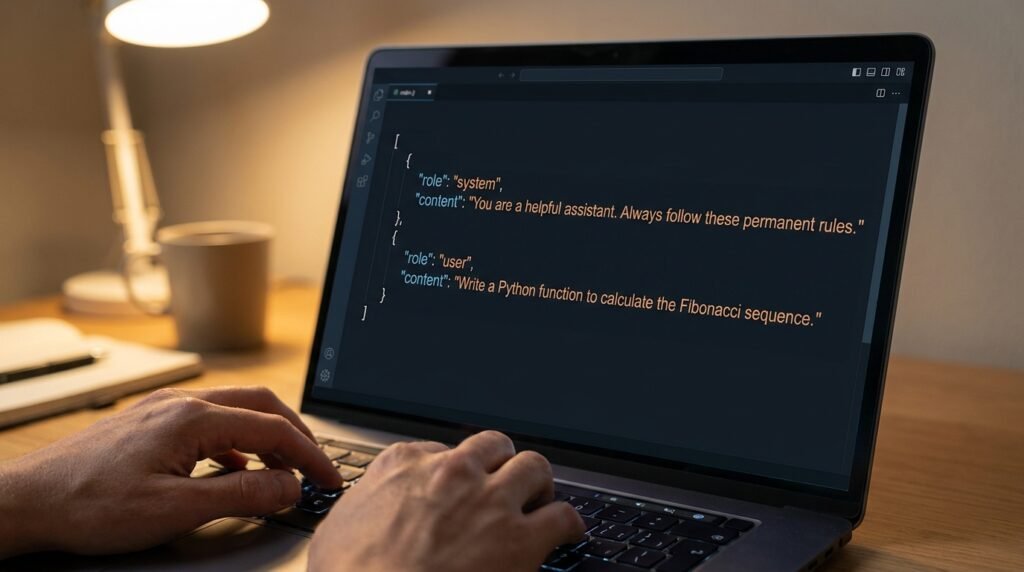
Behind the friendly chat box, the two layers are literally separate fields.
Even if you never write a line of code, it helps to know where this comes from. When a developer calls a model through its API, the request carries named roles: a ‘system’ message that sets behavior, and one or more ‘user’ messages with the actual input. Consumer chat apps hide that and give you a single box, but the same two-layer structure sits underneath. Custom instructions and project settings are just the app’s way of letting you write that system message without seeing the plumbing.
This also explains why a settings change doesn’t reach back into an old chat. Each conversation was sent with the system message it started with, so new standing rules only take hold from the next fresh chat.
A 10-second test for where a rule belongs
Ask one question before you type.
When you’re unsure whether something goes in the settings layer or the chat, ask yourself: would I want this applied to a completely unrelated chat tomorrow? If yes, it’s a standing rule, so it belongs in the system layer. If no, it’s part of today’s task, so it belongs in the message. ‘Always use UK spelling’ passes the test. ‘Make this particular email shorter’ fails it, and stays in the chat where it belongs.
The mix-ups that cause most trouble
Three patterns account for most of the confusion I see.
- Permanent rules typed into chat every time. They work for that one session, then vanish. Anything you want every time belongs in the settings layer, not the chat box.
- Today’s task stuffed into the system instruction. People put a specific request in custom instructions, and then every unrelated chat tries to honor it. Standing rules should describe how you work, not what you’re doing today.
- Contradiction between the layers. Your system instruction says ‘always formal,’ your chat says ‘make it casual,’ and you get something muddled. Decide which one is truly the standing rule, and keep the other as a clearly stated exception.
Questions people actually ask
If I put a rule in settings, does it change my old chats?
Usually no. Most tools apply system or custom instructions to new conversations going forward, not retroactively to chats you already started. If you change a standing rule, open a fresh chat to be sure it takes effect, or restate it in the existing one.
Can the model see its own system instructions?
It’s acting on them, but whether it will tell you what they are depends on the tool and how they were set. Some will summarize their instructions if asked; some are configured not to reveal them. Either way, the instruction is shaping the output even when it isn’t shown in the chat.
Should I keep my system instructions short or detailed?
Short and high-value. Every word in the system layer is re-applied to every message, so bloat there costs you on each turn and can dilute the rules that matter. Put your few non-negotiables in the system layer, and handle the specifics in each user message.
Why does my custom instruction sometimes get ignored?
Common causes: it conflicts with something you typed in the chat, the conversation got long enough that early context faded, or the rule was vague enough to interpret away. Make standing rules specific, keep them short, and restate any that slip during a long session.
Do system instructions make the model follow rules perfectly?
No. They raise the odds a rule is followed, and they beat re-typing rules in chat, but no current model obeys instructions with perfect consistency. For anything that truly must hold, like never sharing a figure, treat the instruction as a strong default and still review the output before it goes out.
Set your standing rules once this week
Open your tool’s custom-instructions or project settings and write down the two or three things you want true in every chat, like your tone, your format, and any hard line you never want crossed. Keep the daily tasks in the chat box where they belong. Spend ten minutes sorting which of your habits are standing rules and which are one-offs, and most of the ‘why won’t it listen’ frustration goes away on its own. Revisit the list once a month, because the rules you need tend to reveal themselves through the corrections you keep making.