
The context-window framework for chaining complex prompts together

Chaining prompts works when you treat the context window as a budget you actively spend, not as infinite memory. The trick has nothing to do with holding a longer conversation. You break one large task into stages, have each stage hand back a small labeled artifact, and carry only those artifacts forward. Do that and the model stops ‘forgetting’ your earlier instructions on long jobs.
What a context window really is
Every word in your chat shares one fixed space.
A context window is the total amount of text a model can hold in view at once, measured in tokens. A token is roughly a four-character chunk of English, so a typical word lands around one to two tokens. Treat that as a ballpark for budgeting, not exact math, because counts shift by model and language.
A quick example makes it concrete. A short instruction like ‘please summarize this meeting’ is a few words and lands near six to eight tokens. A 2,000-word document sits somewhere around 2,600 to 3,000 tokens. Paste that document in and then ask three follow-up questions about it, and you’ve paid its token cost four separate times, once for every turn it stays in view. That repetition is the hidden bill most people never see.
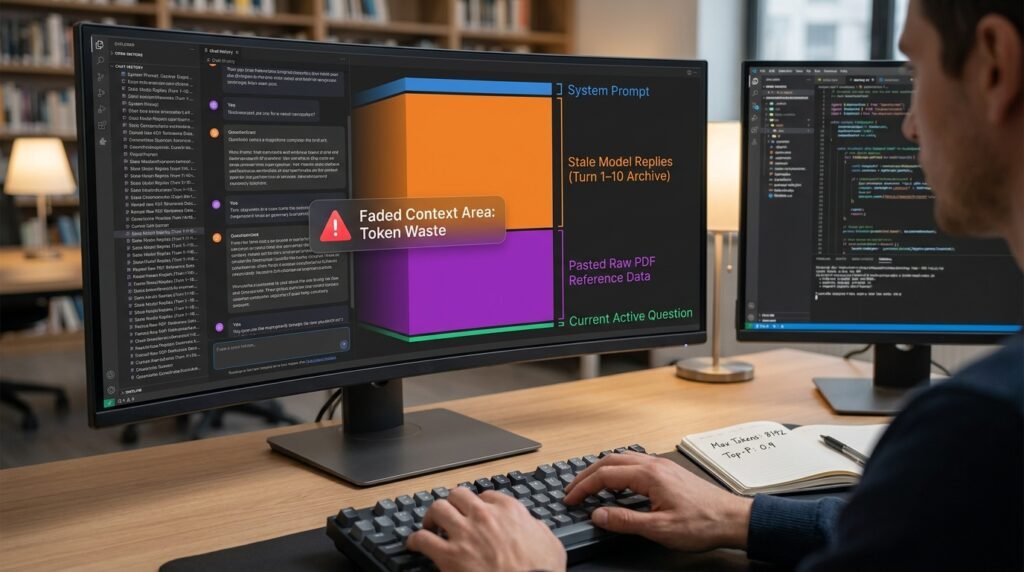
Here’s the part that trips people up. The window holds everything at once: the system prompt, every message you’ve sent, every reply the model has given, and any file you pasted. As the chat grows, it fills. When it gets close to full, the oldest material either falls out of view or gets squeezed for attention. The model didn’t ‘forget’ your stage-one rule. That instruction just lost its place in a crowded room.
One more distinction clears up a lot of confusion. The window is short-term memory for this one conversation. It’s separate from what the model learned in training. A model can know a great deal about the world and still lose track of the instruction you gave four turns ago, because that instruction lives in the window, and the window has a hard edge.
Advertised window sizes vary widely between models and pricing tiers, and they keep climbing, so check the current spec for the tool you use rather than trusting a number you read months ago.
The chaining framework

This is the loop I run for any task too big for a single prompt.
Figure 1. The chain loop, with a checkpoint for token limits GOAL too big for one prompt │ ▼ [1] SPLIT into stages, one job each │ ▼ ┌──────── repeat per stage ────────┐ │ run stage N │ │ ▼ │ │ model returns an ARTIFACT │ │ (a short, labeled output) │ │ ▼ │ │ SAVE it outside the chat │ │ ▼ │ │ carry ONLY that artifact on │ │ to stage N+1, not the chat │ └────────────────┬─────────────────┘ ▼ window near full? │ │ ▼ no ▼ yes next stage CHECKPOINT and restart: summarize progress, open a fresh chat, paste the checkpoint + last artifact │ ▼ [2] ASSEMBLE the final output from the saved artifacts |
The two ideas doing the work are the artifact and the checkpoint. An artifact is a compact, structured output, an outline or a table, that holds the result of a stage in as few tokens as possible. A checkpoint is a short written summary you use to start a clean chat when the window is filling. Together they keep the active conversation small even when the whole task is large.
People sometimes ask why not just keep talking and trust the model to track everything. You can, up to a point. The reason it eventually falls apart is that the conversation and the work compete for the same space. Every clarifying exchange, every ‘actually, change that,’ is more tokens piling up between the model and your original instructions. Artifacts pull the work out of that crossfire.
Managing the token budget across turns
It helps to see what’s actually eating the space.
What sits in the window | Why it keeps growing | How I keep it small |
System prompt or custom instructions | Re-sent automatically every turn | Keep it short; you pay for it on every message |
Your past messages | Each new question stacks on the rest | Start a fresh chat for a new stage |
The model’s past replies | Long answers cost the most of all | Ask for compact artifacts, not essays |
Pasted files or transcripts | Counted in full every turn they stay | Paste once, pull out what you need, then drop them |
The current question | Small, but competes with all the above | Restate key rules here when the chat is long |
The row people miss is the second one. A reply you got ten turns ago is still sitting in the budget, costing tokens, even though you’ve mentally moved on from it. That’s why a single marathon chat degrades while five short chats stay sharp.
There’s a simple tell. If you catch yourself re-pasting the same document or re-explaining the same rule on turn twelve, the early context has already faded, and you’re paying full price to patch it. A fresh chat seeded with a clean artifact would have been faster and cheaper.
Same chat or a fresh chat for each stage?
This is the choice that decides whether a chain stays clean.
Running every stage in one long conversation feels natural, and for a two or three step job it’s fine. The cost shows up on longer chains, where every old turn keeps drawing down the budget. Starting a fresh chat per stage, and pasting in only the artifact you need, keeps the active window almost empty. Here’s how I decide between them.
Situation | Same chat | Fresh chat per stage |
Short job, 2 to 3 stages | Fine, less hassle | Overkill |
Long job, many stages | Degrades as it grows | Stays sharp |
Stages need different rules | Rules bleed across stages | Clean separation |
You want a record of each step | Buried in one long thread | Saved artifacts do this better |
A worked example: messy brief to finished one-pager
Say you need to turn a rambling client brief into a clean one-page proposal. One giant prompt tends to lose the thread halfway. Four stages don’t.
Stage 1: extract
Paste the raw brief and ask for one thing only: a structured list of the client’s goals, their hard constraints, and the budget range they named. That list is your artifact. Save it. You won’t need the rambling brief again.
Stage 1 artifact (this is all you carry forward) GOALS: – Launch a referral program in Q3 – Keep cost per signup under current ad cost CONSTRAINTS: – Must use the existing email tool – Legal must approve any cash incentive BUDGET: client stated 5k to 8k for the quarter |
Stage 2: outline
Open the next step with only the Stage 1 list. Ask for a one-page outline with section headers and a sentence on each. The outline is the new artifact. The original brief never enters this chat.
Stage 2 artifact: the outline carried into Stage 3 OUTLINE (one page): 1. The problem (2 sentences) 2. Proposed referral program (3 sentences) 3. Cost and timeline (small table) 4. What we need from you (one clear ask) |
Stage 3: draft
Feed the outline in and ask for the full draft, section by section. Because the input is a tidy outline and nothing else, the model stays on track instead of reaching back for details it half-remembers.
Stage 4: tighten
Paste the draft and give it one job: cut it to a single page and flag anything not supported by the Stage 1 facts. The result is your finished one-pager.
At no point did the whole history ride along. Each stage saw one clean input and produced one clean output. That separation is the difference between a chain and a long conversation that slowly drifts.
Where chains break, and the fix
Most failures trace back to one of these.
- The model ‘forgets’ a stage-one rule. It didn’t; the rule scrolled out of active view. Restate hard rules in the exact stage that needs them.
- Carried context contradicts itself. You pasted an old artifact and a newer one. Carry only the latest version and delete the superseded one.
- Replies get slow or sloppy. The window is near full. Write a checkpoint and start fresh.
- Artifact formats drift between stages. Give each one an explicit output template so the next stage can read it cleanly.
- A stage tries to do two things. Outputs get muddy when one step both analyzes and writes. Give each stage exactly one verb.
How to write a checkpoint that actually works
A checkpoint is what lets you abandon a bloated chat without losing your place.
When a conversation starts to drag, I stop and write a short note on where things stand, then open a new chat and paste it in alongside the latest artifact. A good checkpoint is specific about state, not a recap of the discussion that got you there. Here’s the shape I use.
A checkpoint template CHECKPOINT Task: turn client brief into a one-page proposal. Done: extracted goals + constraints (see artifact). Current stage: drafting section 3 of 4. Rules still in force: one page max, no invented numbers, formal tone. Next: finish the draft, then cut to one page. |
Notice what’s left out: the back-and-forth that produced these decisions. The new chat doesn’t need the journey, only the current position and the rules that still apply. Five lines like this replace hundreds of tokens of stale conversation.
A pre-flight checklist for any chain
I run through this before starting, and it saves rework later.
- Can I state the end goal in one sentence? If not, I’m not ready to chain yet.
- Have I split it into stages with one job each?
- Does every stage hand back a compact, labeled artifact?
- Am I carrying forward only artifacts, not the whole transcript?
- Do my hard rules appear in the stage that needs them, not just at the start?
- Do I have a checkpoint plan for when the window fills?
When chaining is the wrong call
Chaining carries overhead, so it isn’t free.
For anything a single well-built prompt can finish in one shot, a chain just slows you down and adds more places to make a mistake. I reach for chaining only when a task genuinely won’t fit one prompt, or when I need to check an early step’s output before the rest depends on it. If you can get a clean result in one prompt, do that and skip all of this.
Questions people actually ask
How do I know the context window is full?
Consumer chat tools rarely show a meter, so watch behavior instead. Replies slow down, the model starts contradicting earlier turns, or it asks for something you already gave it. In API work you can count tokens directly and see it coming.
Isn’t a bigger window the whole answer?
It helps, but no. Even with a large window, models attend less reliably to the middle of very long inputs, a pattern researchers named lost in the middle. Good structure still beats brute size, and it costs less per run.
Should I use the tool’s memory feature instead of carrying artifacts?
Memory features are handy for preferences and ongoing context, but they aren’t built for precise multi-stage work. They summarize in the background and can drop the exact detail you needed. For chained tasks, artifacts you control yourself behave more predictably.
Can’t I just paste everything and tell it to remember?
You can, and it holds for a while, then degrades as the window fills. Telling a model to ‘remember’ doesn’t expand its capacity. It just adds more words to the same fixed budget.
Does this work the same across every AI tool?
The principle is universal, since every model has a finite window. The mechanics differ. Some tools auto-summarize old turns for you, some let you edit or delete past messages, and API access gives you exact token counts. Learn what your specific tool does with old context, because that changes how aggressively you need to checkpoint.
How small should an artifact be?
As small as it can be while still carrying everything the next stage needs. A bulleted list beats a paragraph. A table beats a list when there’s real structure. If an artifact is swelling into an essay, that’s a sign the stage is doing more than one job and should be split.
What if a later stage needs something I dropped earlier?
Then it belongs in the artifact. The fix is to widen what the early stage outputs, not to drag the whole transcript along. If Stage 4 keeps needing the budget figure, put the budget in every artifact from Stage 1 onward. Carrying a few extra labeled lines is cheap. Carrying the entire history is not.
Run one real chain this week
Pick a task you’d normally cram into one giant prompt, the kind that keeps drifting halfway through. Split it into three stages, make each one return a labeled artifact, and carry only those forward. When the chat starts feeling sluggish, write a four-line checkpoint and open a fresh window. Keep a plain text file open beside the chat and paste each artifact into it as you go, so that file becomes both your record and your assembly source. You’ll feel the difference on the first job, and you’ll stop blaming the model for what is really a budgeting problem.

Hi I’m Muzammil Haqani. I’m a content creator and AI expert with 3+ years of experience exploring and writing about artificial intelligence and technology. Through this blog, I share tutorials, insights, and practical guides to help readers understand and use AI tools effectively in their everyday lives.