
The differences between native Microsoft Copilot and third-party Excel AI plugins
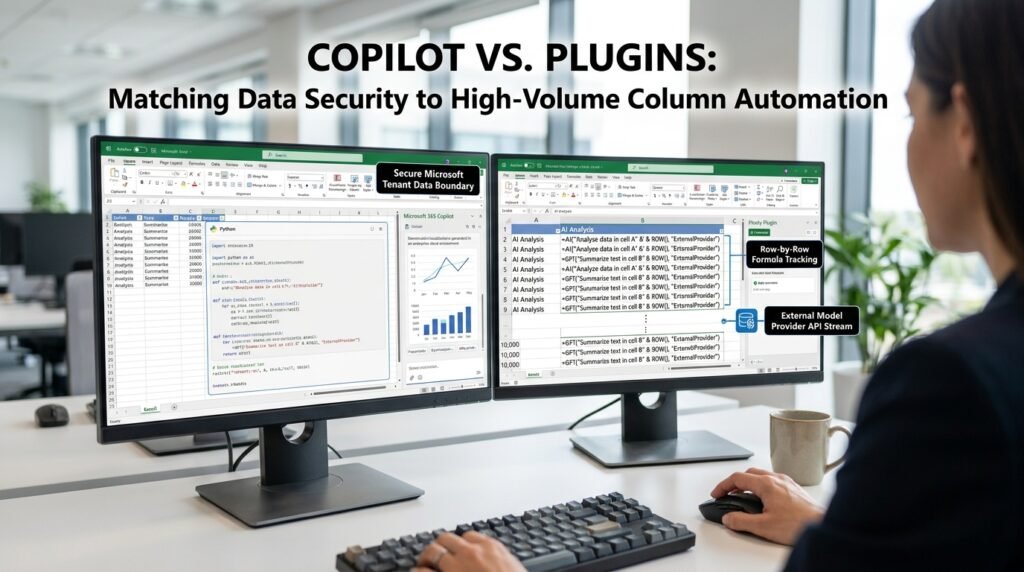
The honest answer to ‘Copilot or a third-party plugin’ is that they’re built for different jobs, and most people only need one. Native Microsoft Copilot keeps your data inside your Microsoft account and shines at everyday analysis and formula help. Third-party plugins add per-cell AI functions and a choice of models for heavy, repetitive processing, at the cost of sending data to an outside provider. The right pick comes down to where your data must stay, how heavy your processing is, and who pays for it.
The three questions that decide it
Start with what you need, not with the tool.
Almost every real decision here turns on three questions, and answering them honestly settles it faster than any feature comparison.
- Where must the data stay? Confidential company data under compliance rules points hard toward native Copilot, which keeps data inside your Microsoft tenant. Low-stakes data can go either way.
- How heavy is the processing? Occasional analysis and formula help favor Copilot. Running an AI function down 10,000 rows favors a plugin built for per-cell calls.
- Who pays, and how? Copilot is usually a per-seat license your organization controls. Plugins typically bill per call or per token, so the cost rises with how much you use them.
First, which 'Copilot' are we talking about?
The name covers more than one product, and the difference matters.
There’s a free Copilot chat you reach in a browser or in Windows, and there’s Microsoft 365 Copilot, the paid layer that lives inside Excel, Word, and the other apps and can act on your actual files. When this comparison says ‘native Copilot,’ it means the second one, the in-Excel assistant that reads your workbook and applies changes. The free chat can help you write a formula if you describe your data to it, but it can’t see your sheet or work across your rows. Knowing which one you have reshapes the whole comparison, because only the in-app version competes with a plugin on real spreadsheet work.
The feature and limitation matrix
Here’s how the two approaches line up on the things that actually differ.
Dimension | Native Copilot | Third-party plugins |
Where your data goes | Stays in your Microsoft tenant | Sent to the plugin’s model provider |
Best at | Everyday analysis and formula help | Bulk per-cell AI down a column |
Per-cell AI function | Not the core design | The main feature, =GPT()-style |
Processing speed | Fast for in-app questions | Depends on the API; bulk runs can drag |
Context limit | Bounded by its model; verify current | Each cell call is small; model-bounded |
Formula accuracy | Generates and can apply in-app | Generates text you paste and test |
Cost model | Per-seat license | Usually per call or per token |
Setup | Built in, where licensed | Install an add-in, connect an API key |
Model choice | Microsoft’s models | Often your pick of provider |
Read down the first column and the headline is clear. The real split is about where your data lives and what style of work you’re doing, not about which tool is ‘smarter.’ They mostly run on similar underlying models.
Where native Copilot genuinely wins
Its advantages are about trust and fit, not raw capability.
Because it works inside your Microsoft account, your data never leaves the tenant, which for regulated or confidential work is the entire ballgame. It reads the context around your workbook, the related files and account data your organization already governs, so its answers fit your environment. There’s no API key to manage and no per-call meter ticking, and it can apply a change directly in the sheet rather than handing you text to paste. For a knowledge worker doing analysis on company data, that combination is hard to beat and easy to live with.
Where a third-party plugin pulls ahead

Plugins exist for the job Copilot wasn’t designed around: bulk generation, cell by cell.
A per-cell AI function lets you classify ten thousand rows, draft five hundred product descriptions, or tag a column of feedback, all with a formula you fill down. That’s the core feature, and native Copilot doesn’t really compete with it. Plugins also let you choose the model and provider, and they work without a Microsoft Copilot license, which matters if your organization hasn’t bought one. For a power user doing repetitive generative work on data that isn’t sensitive, a plugin is the better fit, as long as you watch the call count.
Context limits: the ceiling people hit first
Both tools run into the same wall, just from different sides.
Every model behind these tools has a finite context window, so neither one truly ‘understands’ a hundred-thousand-row sheet in a single look. Copilot reasoning over a large selection can ask the model to hold more than it comfortably can, which is where its answers start to drift. A per-cell plugin keeps each call tiny, so it never overloads the window, but it pays for that by not being able to reason across rows in one shot; every cell is its own little world. Either way, the move is the same: aggregate or filter the data first, and verify the current limits for your specific tool and tier, because they keep changing.
Formula accuracy: who's more reliable
Neither tool should be trusted with a formula you haven’t checked.
Both can produce a wrong formula, and the accuracy depends more on how you prompt, whether you gave it your headers and locale, than on which wrapper you used. Copilot has a small edge in that it generates and applies inside Excel, so it sometimes catches a bad reference in context. A plugin hands you text to paste, which means a locale or column mistake surfaces only after you run it. The safe habit is the same for both: read the formula, test it on a known row, and never ship one you can’t explain.
The verdict: who should pick what
Most people fit cleanly into one of four cases.
Your situation | The call |
Analysis on company data, Microsoft shop | Native Copilot, if you’re licensed |
Bulk generative work on non-sensitive data | A third-party plugin |
Confidential data, no clear policy yet | Native Copilot, or nothing external |
Tiny, occasional needs | Maybe neither; a free chat tab plus paste |
The fourth row is the one people forget. For a once-a-month question, a browser chat model and a clean paste cost nothing and need no setup at all.
The trap: paying for power you'll never use
The most common mistake is buying capability that doesn’t match the task.
People install a heavy paid plugin for a job that native Copilot or even plain functions would handle, then pay per call and route their data to an outside server for no real gain. Organizations buy Copilot seats for everyone when a handful of analysts are the only ones who’d use them. The fix is unglamorous: write down the actual recurring task before you shop, and match the tool to that, not to the impressive demo. A pattern fix that runs as a formula doesn’t need an AI plugin at all.
A note on data and privacy

This is the difference that should outweigh the others when it applies.
Native Copilot keeps your data under the agreements your organization already has with Microsoft. A third-party plugin sends your cell contents to its own model provider, under that provider’s terms, which may or may not match your compliance needs. For regulated or confidential data, that single fact usually ends the debate, no matter how appealing a plugin’s features look. Before you connect any plugin to real data, read its data-handling terms and check your organization’s policy.
A realistic month with each tool
The contrast is clearest in everyday use, not on a spec sheet.
A month with native Copilot looks like asking your workbook questions in plain language, ‘which regions missed target,’ getting a chart back, having it draft a formula you then check, and summarizing a sheet for an email, all without your data leaving the tenant and without a usage meter running. A month with a plugin looks different. You set up a per-cell function once, fill it down a column of two thousand rows to classify or rewrite them, keep an eye on the call count, and paste the results back as values. One is a conversation about your data; the other is a production line for it. Most people lean on one of those modes far more than the other, and that’s the tool worth paying for.
The hidden costs people miss
The sticker price is rarely the real price.
With a plugin, the per-call billing creeps. A function filled down a long column, then recalculated every time the sheet changes, can quietly multiply your bill, which is why pasting results as values matters as much for cost as for tidiness. With native Copilot, the hidden cost is the license floor: it’s priced per seat, so it only pays off once enough people use it to justify the standing fee. Both also carry a review cost no plan lists, the time someone spends checking the output, which is real work whichever tool produced it. Counting only the subscription misses the part of the cost that actually scales with use.
Trialing a plugin without regret
If you’re going to test one, test it the safe way.
Start on a throwaway copy that holds no sensitive data, so a generous trial can’t leak anything that matters. Run it on the actual task you’re weighing it for, not the vendor’s demo, and watch two numbers: how many calls a real job burns, and how often you have to correct the output. Set a hard stop on the trial date, so a free week doesn’t roll into a paid month you forgot about. And before you connect it to anything real, read where the data goes. A plugin that earns its place still looks good after that scrutiny; one that doesn’t was never going to be safe to scale.
Questions people actually ask
Can I use both?
Yes, and plenty of people do. Copilot handles daily analysis on company data, while a plugin runs bulk generation on a separate, non-sensitive workbook. The one rule worth holding is to keep confidential data out of the third-party plugin, since that’s the line that actually carries risk.
Is Copilot’s analysis more accurate than a plugin’s?
Accuracy comes mostly from the underlying model and your prompt, not from the wrapper around it, so the two are closer than marketing suggests. The differences that matter are where the data goes, whether you need bulk per-cell processing, and how each one bills you.
Do plugins work without a Copilot license?
Yes, and that’s a big part of their appeal. They call their own model’s API, so you don’t need a Microsoft 365 Copilot license to use one. You do need to install the add-in and usually supply an API key or pay a subscription.
Why is my per-cell plugin slow and expensive on big sheets?
Because it makes one API call per cell, so ten thousand cells means ten thousand calls. Filter or aggregate first, run the AI only on the rows that genuinely need it, and paste the results back as values so they don’t recompute every time you touch the sheet.
Is my data used to train the model in either case?
That depends on the specific product and its terms, so check rather than assume. Enterprise Microsoft agreements generally treat your tenant data as yours and not as training material, while a third-party plugin runs under its own provider’s terms, which vary widely. For sensitive data, read the data-use clause before you commit, because ‘processed’ and ‘used for training’ are very different promises.
Match the tool to the task, then test on a copy
Write down your actual recurring spreadsheet task and answer the three questions: where the data must stay, how heavy the processing is, and who pays. If it’s company data and everyday analysis, reach for native Copilot. If it’s bulk generation on non-sensitive data, trial a plugin on a throwaway copy and keep an eye on the call count. And before you buy anything, check whether a clean sheet and a free chat tab would already cover the job.

Hi I’m Muzammil Haqani. I’m a content creator and AI expert with 3+ years of experience exploring and writing about artificial intelligence and technology. Through this blog, I share tutorials, insights, and practical guides to help readers understand and use AI tools effectively in their everyday lives.